Our Top Picks
- Best Overall for Professionals: Polycam. It offers the most robust set of export options, including CAD-ready files, and features an industry-leading interface for architectural visualization and room scanning.
- Best Free Alternative: Scaniverse. This is the top choice for hobbyists and social media creators, offering powerful 3D reconstruction and Gaussian Splatting for free.
An iPhone 3D scanner utilizes the built-in LiDAR sensor to measure distances using light pulses, creating detailed point clouds and meshes. Using apps like Polycam, users capture objects or rooms by moving the device around the subject from multiple angles. The software processes these measurements into 3D models suitable for floor plans, digital twins, or AR walkthroughs, which can then be exported in formats like OBJ, STL, or GLB.
Ever since the launch of the iPhone 12 Pro in late 2020, Apple has been quietly shipping a professional-grade spatial sensor in the pockets of millions. While many users initially saw it as a tool for better low-light photography, the tech community quickly realized that the iPhone 3D scanner potential was the real story. In 2026, the landscape of mobile spatial computing has matured, and the gap between a consumer smartphone and a professional laser scanner has narrowed significantly. Leading this charge is Polycam, an app that has fundamentally changed how we digitize the physical world.
Hardware Check: Does Your iPhone Have LiDAR?
Before diving into the software, it is essential to confirm your hardware capabilities. Not every iPhone is a best 3D scanner for iPhone candidate because the specialized sensor is reserved for the Pro lineup. The easiest way to tell is to look at the camera island on the back of your device.
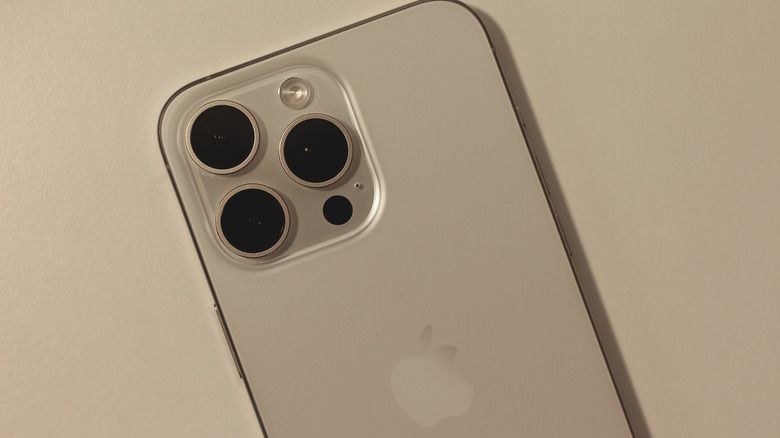
The LiDAR (Light Detection and Ranging) sensor appears as a small, solid black circle, roughly the same size as the flash but flush with the glass. This is a Time-of-flight sensor that works by emitting infrared light pulses and measuring how long they take to bounce off objects. Unlike standard cameras that rely on visual data, the iPhone LiDAR sensor generates a depth map with a resolution of approximately 256 x 192 pixels, resulting in nearly 49,000 depth points per frame.
Compatible models include:
- iPhone 12 Pro & 12 Pro Max
- iPhone 13 Pro & 13 Pro Max
- iPhone 14 Pro & 14 Pro Max
- iPhone 15 Pro & 15 Pro Max
- iPhone 16 Pro & 16 Pro Max
- iPhone 17 Pro & 17 Pro Max
- iPad Pro (2020 models and newer)
If you own a standard iPhone or a Mini model, you can still perform 3D scanning using a technique called photogrammetry, which uses standard photos to reconstruct a model. However, you will miss out on the instant, real-time depth sensing that makes an iPhone LiDAR app so powerful for measuring large spaces or dark corners.
Polycam Review: Unlocking the Pro Sensor
In the crowded market of spatial apps, Polycam has emerged as the definitive iPhone 3D scanner. Its success is not just about the math behind the mesh reconstruction; it is about the user experience. Since its inception, Polycam has been used to create over 34 million 3D captures and digitize more than 2 billion square feet of real-world spaces.
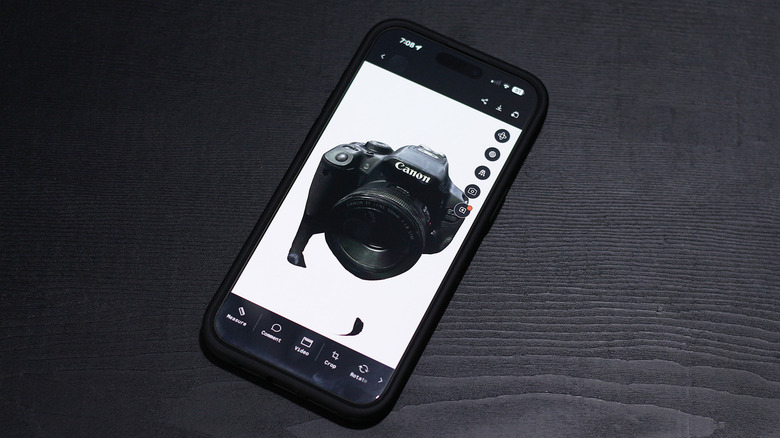
When you open Polycam, you are presented with three primary modes: LiDAR, Photogrammetry, and Room. The LiDAR mode is the star for rapid captures. As you move around a room, you see a colorful heat map "painting" over the physical surfaces in real-time. This visual feedback is crucial because it shows you exactly where the sensor has gathered data and where you have missed a spot. This helps in improving iPhone LiDAR scan accuracy by ensuring no gaps are left in the digital twin.
Pro Tip: To get the best results, move slowly and steadily. Sudden jerky movements can confuse the sensor's internal positioning (SLAM), leading to "drift" where walls don't quite align.
One of the most impressive updates in recent years is the integration of Apple's RoomPlan API. When you use the Room mode, Polycam can automatically identify walls, doors, windows, and even furniture. Instead of a messy point cloud, you get a clean, simplified 3D box model of your home. This makes it perhaps the best iPhone LiDAR app for floor plans currently available.
Scan-to-CAD: Professional Workflows and Exports
While hobbyists enjoy seeing a 3D version of their living room, the professional value of Polycam lies in its export capabilities. For architects, interior designers, and contractors, the app serves as a bridge between the physical site and the digital drawing board.
The precision is surprisingly high for a consumer device. Polycam's spatial reporting tools can achieve measurement precision within 99.3% accuracy compared to traditional professional-grade laser measurements. This 1% margin is often acceptable for initial site surveys, furniture layout planning, and architectural visualization.
When you are ready to take your work further, the "Scan-to-CAD" pipeline is where the app shines. You can export your models into various professional formats:
- OBJ and GLB: General purpose 3D formats for gaming or web.
- STL: The go-to format for 3D printing.
- DXF and DWG: Essential for AutoCAD and Revit workflows.
- XYZ: Raw point cloud data for advanced engineering.
A common workflow for designers involves capturing a space on-site, then exporting iPhone 3D scans to Blender for editing. In Blender, you can clean up the mesh reconstruction, add more realistic texture mapping, and integrate the scan into a larger digital project. Polycam makes this transition seamless by offering a web-based cloud portal where you can manage your captures and download them in the required format directly to your workstation.
Polycam vs. Scaniverse: Which Should You Choose?
If you are just starting your journey into 3D scanning, you might wonder why you should pay for a Polycam subscription when apps like Scaniverse are available for free.
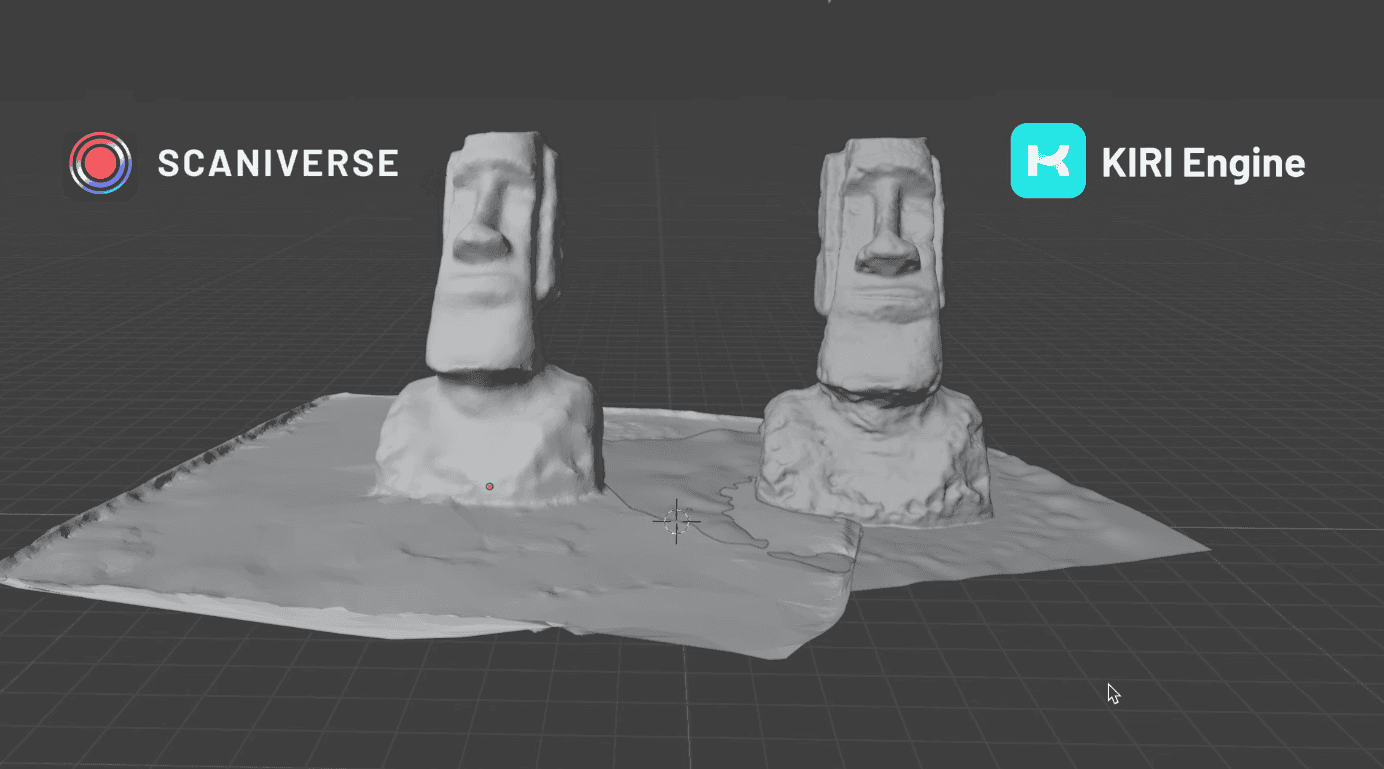
Scaniverse, now owned by Niantic, provides a compelling alternative, particularly for those interested in the artistic side of scanning. It has gained significant traction for its Gaussian Splatting capabilities. Unlike traditional mesh reconstruction, which creates a skin over a frame, Gaussian Splatting uses a cloud of semi-transparent "splats" to represent light and volume. This results in incredibly realistic-looking captures that look almost like a video, though they are much harder to edit in CAD or BIM software.
| Feature | Polycam | Scaniverse |
|---|---|---|
| Primary Audience | Professionals & Architects | Hobbyists & Creative Artists |
| Best For | Floor plans, CAD exports | Realistic visuals, Social sharing |
| Key Tech | LiDAR, RoomPlan, Photogrammetry | LiDAR, Gaussian Splatting |
| Cost | Subscription for Pro exports | Entirely Free |
| Accuracy | High (99.3%) | High |
| Export Formats | Extensive (DWG, RVT, STL, OBJ) | Moderate (OBJ, GLB, FBX) |
When comparing Polycam vs Scaniverse for 3D modeling, the choice depends on your end goal. If you need a digital twin to renovate a bathroom or calculate the square footage of a commercial space, Polycam is worth every penny of its subscription. If you want to capture a beautiful 3D memory of a forest path or a street performer to share on Instagram, Scaniverse is likely the better tool.
Tips for Improving iPhone LiDAR Scan Accuracy
To get the most out of your iPhone 3D scanner, you must understand the limitations of the hardware. LiDAR struggles with two things: mirrors and very thin objects. Because the sensor relies on light reflection, a mirror looks like a "hole" or a deep room to the sensor.
Here is how to ensure your captures are top-tier:
- Consistent Lighting: Avoid scanning in pitch black or under harsh, direct sunlight that can wash out the textures.
- Clear the Clutter: If you are scanning a room for a floor plan, try to remove small obstacles that might break the line of sight between the sensor and the wall.
- Overlap Your Paths: When walking around an object, ensure you are overlapping your previous "brush strokes" to give the software enough common points to stitch the mesh together.
- Mind the Distance: The iPhone's LiDAR has an effective range of about 5 meters (roughly 16 feet). Stay within this distance for the best point cloud density.
FAQ
Does the iPhone have a built-in 3D scanner?
Yes, but it is not a standalone "3D scanner" app in the traditional sense. It has a built-in LiDAR sensor located on the back camera array. To use it for creating 3D models, you need to download a third-party iPhone LiDAR app like Polycam or Scaniverse.
Which iPhone models include a LiDAR scanner?
The LiDAR sensor is exclusive to the Pro and Pro Max models. This includes the iPhone 12 Pro, 13 Pro, 14 Pro, 15 Pro, 16 Pro, and the 17 Pro series, as well as the 11-inch and 12.9-inch iPad Pro models from 2020 onwards.
How accurate is the iPhone LiDAR scanner?
The scanner is remarkably accurate for a mobile device, achieving roughly 99.3% precision in spatial reporting. While it is perfect for room layouts, furniture fitting, and hobbyist 3D modeling, it may not meet the millimeter-perfect requirements of heavy industrial engineering.
What is the difference between LiDAR and photogrammetry on iPhone?
LiDAR uses active light pulses to measure distance instantly, making it great for large spaces and low light. Photogrammetry uses dozens of standard high-resolution photos and processes them to find depth, which usually results in better visual textures and higher detail on small objects but takes longer to process.
Can an iPhone 3D scan be used for 3D printing?
Yes, you can export your scan as an STL file. However, keep in mind that raw scans often require some "cleanup" in a program like Blender or Meshmixer to ensure the model is manifold (watertight) and has a flat base before it can be successfully printed.
Is the iPhone 3D scanner good enough for professional CAD?
It is excellent for the "Scan-to-CAD" initial phase. It allows professionals to quickly generate a 3D floor plan or site survey that can be imported into Revit or AutoCAD. While it won't replace a $20,000 Leica station for high-precision construction, it is a game-changer for rapid documentation.