Our Top Picks
The Dell XPS 16 9640 is a high-end Windows 11 laptop that prioritizes a futuristic, minimalist aesthetic with its invisible touchpad and zero-lattice keyboard, making it a top choice for style-conscious creators who value a 16-inch OLED experience. It is a premium workstation that trades some traditional user-friendliness for a bleeding-edge design that looks like nothing else on the market.
The Dell XPS 16 9640 is a masterclass in minimalist design, but does its 'unified' aesthetic hinder productivity? As a premium content creator workstation, it pushes the boundaries of the Intel Evo platform with Meteor Lake architecture. However, before investing in this CNC machined aluminum powerhouse, you need to understand the learning curve of its haptic glass touchpad and capacitive function row. In this guide, we break down its real-world battery life and performance to see if it truly replaces the MacBook Pro 16.
Specs-at-a-glance
| Feature | Specification |
|---|---|
| Processor | Intel Core Ultra 7 or Ultra 9 (Meteor Lake) |
| Graphics | Integrated Intel Arc or NVIDIA GeForce RTX 4050/4060/4070 (60W TGP) |
| Memory | 16GB to 64GB LPDDR5x (Soldered) |
| Storage | Up to 4TB PCIe Gen4 SSD (Single M.2 Slot) |
| Display | 16.3-inch FHD+ (1920x1200) 120Hz or 4K+ OLED (3840x2400) 90Hz |
| Battery | 99.5Whr with ExpressCharge 1.0 |
| Weight | Starting at 4.7 pounds (2.13 kg) |
| Thickness | 18.7 mm (0.74 inches) |
The Design Revolution: Minimalist Interface and the Learning Curve
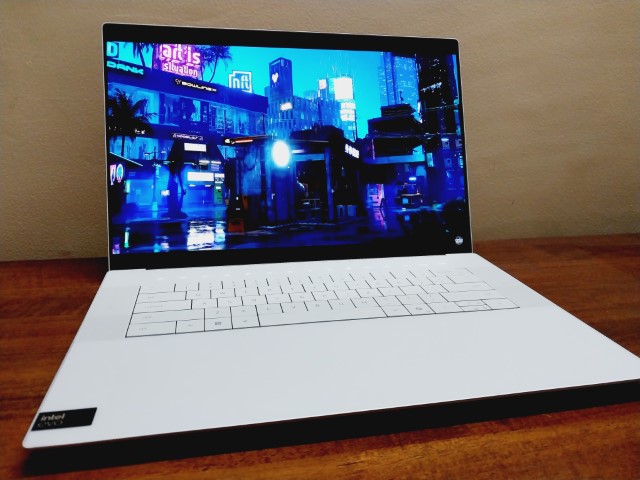
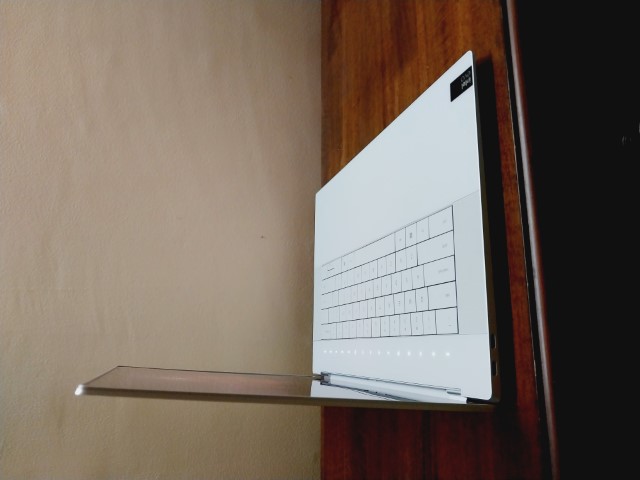
When you first open the Dell XPS 16 9640, you are greeted by what is perhaps the most polarizing design in the computing world today. Following the lead of the XPS 13 Plus, Dell has expanded its "unified" aesthetic to the 16-inch form factor. The chassis is a marvel of engineering, carved from a single block of CNC machined aluminum that feels incredibly dense and premium. With a starting weight of 4.7 pounds (2.13 kg) and a thickness of 18.7 mm (0.74 inches), it sits firmly in the desktop replacement category without being overly bulky.
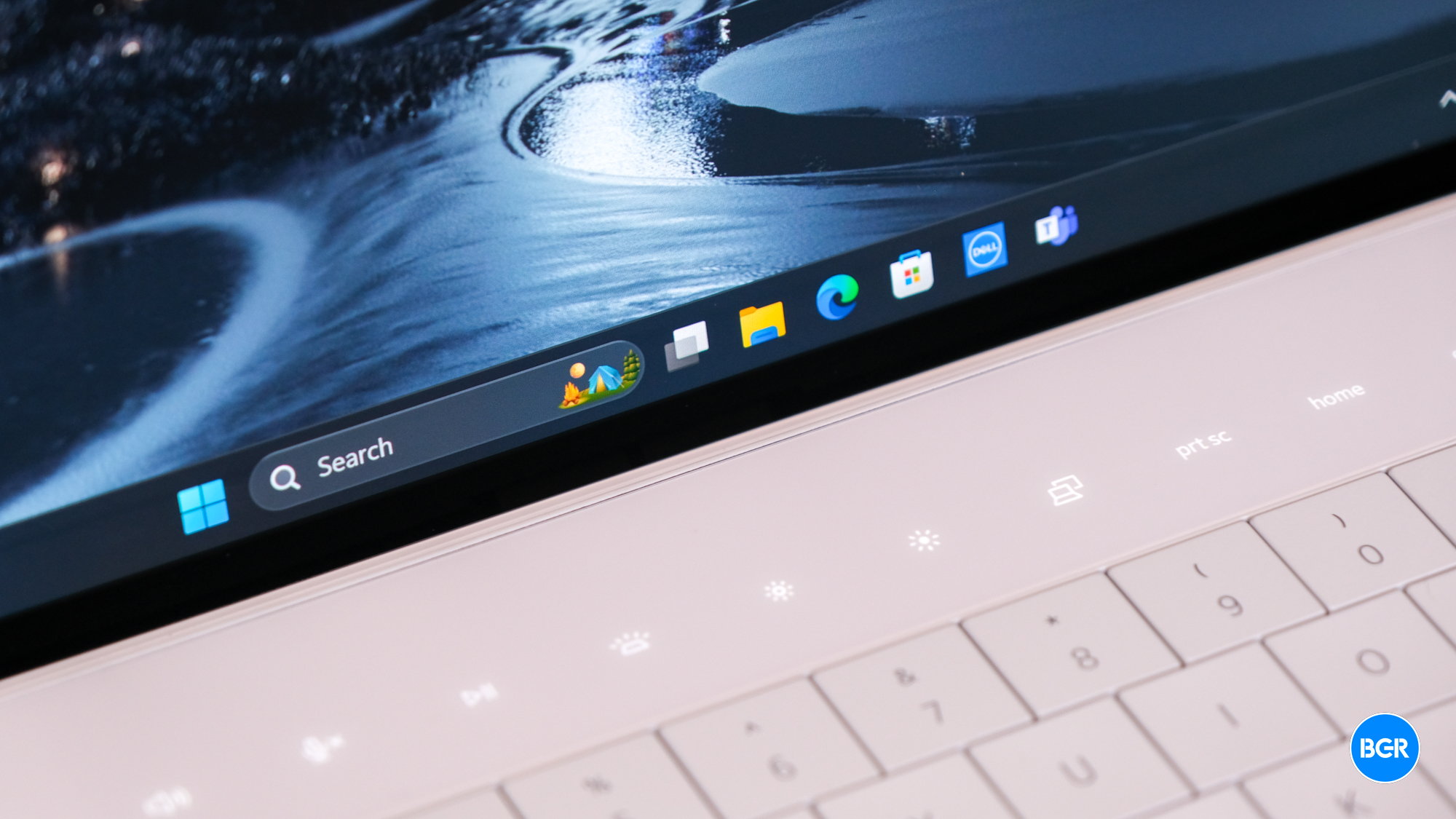
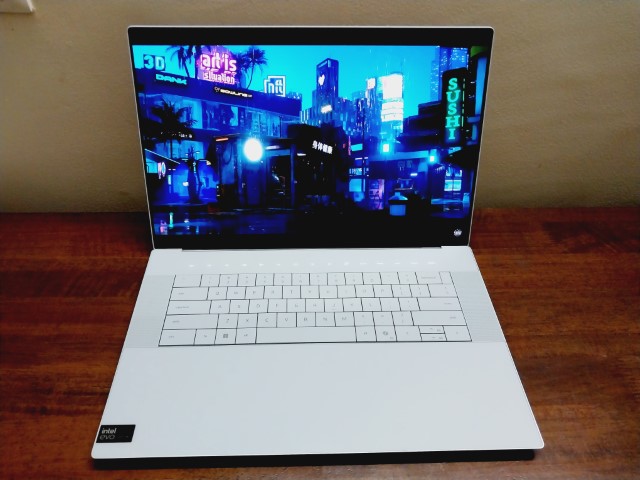
However, the real talking point is the interface. Dell has removed almost all visual cues for interaction. The zero-lattice keyboard features large, flat keycaps with no space between them, creating a flush surface that looks stunning but can lead to frequent typos during the first few days of use. Above the keys sits the capacitive function row, which toggles between media keys and traditional F-keys with a touch. The most significant omission is a physical Escape key—a move that might frustrate developers and power users who rely on tactile feedback for muscle memory.
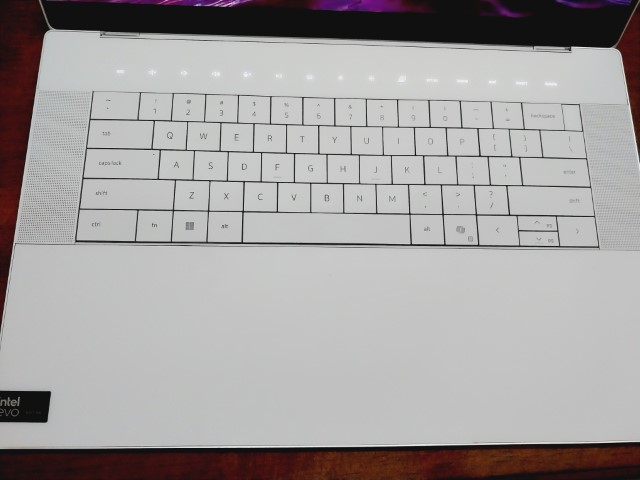
The Dell XPS 16 9640 minimalist interface learning curve is most apparent with the haptic glass touchpad. There are no lines, no edges, and no physical movement. The entire palm rest is a smooth pane of Gorilla Glass 3. While the haptic feedback is excellent and customizable, the lack of borders means you will occasionally find your fingers drifting outside the active tracking area.
Pro Tip: To master the invisible touchpad, imagine the active area starts directly below the spacebar and extends to the edges of the Alt keys. Practice clicking in the center until the haptic response becomes second nature.
Performance Realities: Meteor Lake and the 60W TGP Trap
Under the hood, the Dell XPS 16 9640 is powered by the latest Meteor Lake architecture, specifically the Intel Core Ultra family. These chips include a dedicated NPU (Neural Processing Unit) to handle AI-driven tasks, which is becoming a standard requirement for the Intel Evo platform in 2024. For those interested in Dell XPS 16 9640 video editing with RTX 4070, the performance is respectable, but there is a technical caveat every buyer should know: the 60W TGP limit.
While the laptop can be configured with a powerful NVIDIA GeForce RTX 4070, Dell has tuned the GPU for a 60W Total Graphics Power (TGP) limit. In the world of high-end laptops, this is relatively low. Thicker gaming laptops might push this same GPU to 115W or higher. The result is a machine that runs cooler and quieter but doesn't reach the raw frame rates of its bulkier competitors. This is a deliberate choice for thermal management; Dell prefers a system that maintains consistent performance without excessive fan noise, which is vital for professional environments.
Inside, you will find high-speed LPDDR5x memory, but be warned: the RAM is soldered to the motherboard and cannot be upgraded later. If you are a professional content creator workstation user, I strongly recommend opting for 32GB or 64GB at the time of purchase. Storage is limited to a single M.2 slot, meaning you can upgrade your capacity, but you can't add a second drive for redundant backups.
Display and Battery: The IPS vs. OLED Decision Matrix
Dell offers two primary screen options for the 9640, and your choice here will radically alter your Dell XPS 16 9640 battery life and performance experience.
The entry-level option is a 16.3-inch FHD+ (1920 x 1200) IPS panel. This screen is PWM-free, making it easier on the eyes for those sensitive to flickering, and it boasts a 120Hz refresh rate. The trade-off is lower pixel density. On the high end, you can opt for the 4K+ OLED touchscreen with a resolution of 3840 x 2400 pixels. This panel offers a stunning 100% DCI-P3 color gamut, making it the gold standard for photo and video editing.
| Feature | FHD+ IPS Panel | 4K+ OLED Panel |
|---|---|---|
| Refresh Rate | 120Hz | 90Hz |
| Resolution | 1920 x 1200 | 3840 x 2400 |
| Battery Life (Est.) | Up to 25 hours | Up to 18 hours |
| Color Gamut | 100% sRGB | 100% DCI-P3 |
| Touch Support | No | Yes |
Every model is equipped with a 99.5 Whr 6-cell lithium-ion battery, which is the largest allowed by the FAA for air travel. Thanks to ExpressCharge 1.0, you can regain significant power in just an hour of charging. In my Dell XPS 16 9640 battery life real world test, the FHD+ model lasted through a full workday with ease, whereas the OLED model required a mid-afternoon top-off during heavy creative workloads.
Competitive Analysis: Choosing Your 16-Inch Powerhouse
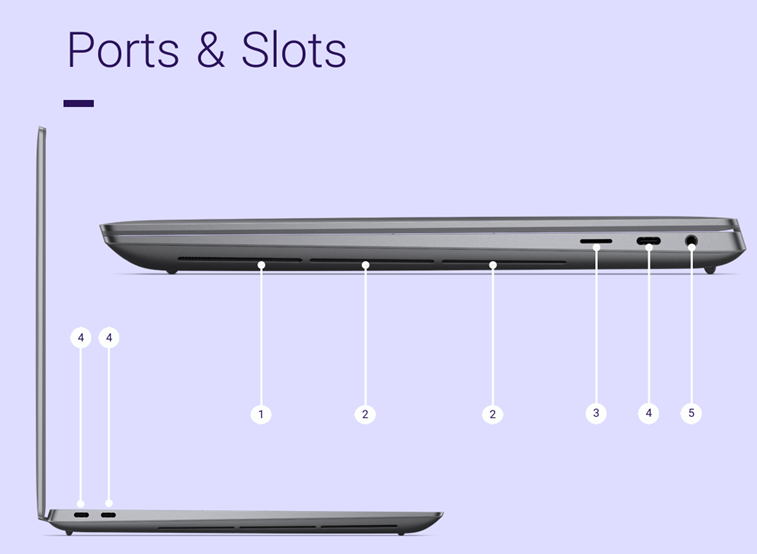
When comparing the Dell XPS 16 9640 vs HP Spectre x360 16, the choice often comes down to connectivity versus power. The HP Spectre is a versatile 2-in-1 that includes a wider array of physical ports, including HDMI and USB-A. In contrast, the Dell XPS 16 9640 port connectivity and adapter advice is simple: embrace the USB-C ecosystem. The laptop features three Thunderbolt 4 (USB-C) ports and a microSD card reader. Dell does bundle a USB-C to USB-A and HDMI adapter in the box, but for a true desktop replacement setup, you will likely need a high-quality Thunderbolt dock.
Against the 16-inch MacBook Pro, the Dell XPS 16 9640 offers a more familiar Windows 11 productivity environment and the flexibility of a touchscreen. While the MacBook Pro's M3 chips are more power-efficient, the XPS 16 allows for easier storage replacement (if you're comfortable opening the chassis) and provides a display that many find more vibrant for media consumption.
If you are choosing between the Dell XPS 16 9640 vs HP Spectre x360 16 for productivity, the XPS wins on sheer GPU potential with its RTX 4070 option, whereas the Spectre is better suited for those who need a tablet mode and stylus support for note-taking or sketching.
Final Verdict: Hidden Costs and Buying Advice
Is the Dell XPS 16 9640 worth the money in 2024? The answer depends on your appreciation for industrial design. You are paying a premium for the CNC machined aluminum build and the futuristic interface. There are "hidden costs" to consider—specifically the price jump for the OLED screen and the fact that you cannot add more RAM later.
If you can move past the initial Dell XPS 16 9640 invisible touchpad usability tips and the capacitive touch row, you are left with one of the most capable and beautiful Windows laptops ever made. It isn't a gaming machine, despite the RTX branding; it is a sophisticated tool for professionals who want the power of a desktop replacement without the "gamer" aesthetic.
Buy it if: You want the best-looking Windows laptop on the market, you need a high-accuracy OLED screen for creative work, and you appreciate a quiet, thermal-efficient machine.
Skip it if: You rely heavily on legacy ports, you need a physical Escape key for your workflow, or you want the absolute maximum gaming performance from an RTX 4070.
FAQ
Is the Dell XPS 16 9640 worth it?
For users who value premium build quality and a futuristic design, the laptop is worth the investment. It provides a unique aesthetic and top-tier display options that few competitors can match, though the price reflects its status as a luxury workstation.
What is the battery life of the Dell XPS 16 9640?
The battery life varies by display choice. The FHD+ model can reach up to 25 hours in light usage scenarios, while the 4K+ OLED version typically provides around 18 hours. Real-world creative tasks like video editing will see these numbers drop to 6-8 hours.
How does the XPS 16 9640 compare to the MacBook Pro 16?
The XPS 16 offers a familiar Windows 11 environment and a high-resolution OLED touch display, which the MacBook lacks. However, the MacBook Pro typically offers better power efficiency and a more traditional keyboard and trackpad layout with physical ports.
What display options are available for the XPS 16 9640?
Dell offers a 120Hz FHD+ (1920x1200) IPS panel for maximum battery life and an optional 90Hz 4K+ (3840x2400) OLED touchscreen for professionals who require 100% DCI-P3 color accuracy.
Is the Dell XPS 16 9640 good for video editing?
Yes, especially when configured with the RTX 4070 and 32GB of RAM. While the GPU is limited to 60W TGP, it is more than capable of handling 4K video timelines and rendering tasks efficiently within a slim chassis.