Quick Facts
- Physical Longevity: Most units remain functional for 7 to 10 years, significantly outlasting the industry average for Windows laptops.
- Professional Utility: High-end creative workflows typically require an upgrade after 3 to 5 years to maintain peak efficiency.
- Software Support: Apple provides macOS updates for approximately 7 years, followed by 2 years of critical security patches.
- Battery Endurance: Batteries are rated for 1,000 full charge cycles before dropping to 80% of original capacity.
- Optimal Architecture: For those buying in 2026, Apple Silicon models offer a significantly higher longevity ceiling than legacy Intel machines.
- Maintenance Rule: Following the 20-80 battery charge rule and maintaining 20% SSD headroom can add years to a device's life.
Most MacBook Pro models remain functional for seven to ten years, though official macOS support typically ends after seven or eight years. While the hardware often remains durable, performance may decline as newer software demands more system resources, making the MacBook Pro lifespan a balance between physical health and software compatibility. Users with high-performance workflows often feel the need to upgrade after three to five years, whereas light users can stretch usability to a full decade.
The Three Stages of MacBook Longevity
Understanding how long your laptop will last requires looking past the aluminum chassis and into the software lifecycle. In my years testing hardware, I’ve observed that a MacBook doesn't just "die" one day; it moves through three distinct phases of decline.
The first stage is Full Support. This usually lasts about seven years from the model’s release date. During this window, your machine is eligible for the latest version of macOS, including major releases like the upcoming macOS 26. You get every new feature, from UI overhauls to deep system optimizations. For most users, this is the golden era where the machine feels fast and capable of handling creative workflows without compromise.
The second stage is the Security-Only period. Once a model is removed from the compatible devices list for the latest macOS, Apple generally provides security updates for another two years. While you can’t run the newest software features, your data remains protected from modern security vulnerabilities. This is often where a 10 year old MacBook Pro still usable in 2026 finds itself—functionally capable of browsing and word processing, but locked out of the newest ecosystem tools.
Finally, the device enters the Vintage and Obsolete status. Apple classifies products as vintage when they stopped distributing them for sale more than five and less than seven years ago. Obsolete products are those discontinued more than seven years ago. At this point, official hardware repairs from Apple become difficult or impossible because parts are no longer manufactured.

Hardware Reality: Intel vs. Apple Silicon in 2026
If you are looking at the average lifespan of MacBook Pro in 2026, the architecture inside the machine is the single most important factor. We are currently witnessing a massive divergence between older Intel-based models and the newer Apple Silicon (M-series) lineup.
The transition to Apple Silicon changed the trajectory of MacBook Pro lifespan. Older Intel models, even the high-end 16-inch versions from 2019, struggle with thermal management. They run hot, which leads to thermal throttling—a process where the CPU slows itself down to prevent heat damage. Heat is the silent killer of computer components, accelerating hardware degradation over time.
In contrast, the M1, M2, and M3 chips are built on ARM architecture, which is incredibly power-efficient. They deliver more performance per watt, meaning they stay cooler during intensive tasks. When considering an M1 vs Intel MacBook Pro longevity comparison for 2026 buyers, the M1 remains the superior choice despite its age. The unified memory architecture and superior power efficiency mean these chips will likely remain relevant for the macOS software update cycle much longer than their Intel predecessors.
For those clinging to older machines, macOS 26 compatibility for older Intel Macs is becoming increasingly unlikely. Apple is progressively stripping Intel support from its operating system to focus on the specialized Neural Engine and GPU capabilities of its own silicon. If you are buying a used machine today, even a base-model M1 Air will likely outlive a top-tier 2019 Intel i9 MacBook Pro in terms of useful software life.

Critical Maintenance: The MacBook Pro Longevity Guide
You can’t control Apple’s software roadmap, but you can control how well the physical hardware holds up. A MacBook Pro maintenance guide isn't just about keeping the screen clean; it’s about managing the invisible wear and tear on the battery and storage.
The most critical component to watch is the lithium-ion battery. Most MacBook Pro models are engineered to retain 80 percent of their capacity after 1,000 full charge cycles. To maximize this, you should follow the how to extend MacBook Pro battery life 20-80 rule. This involves keeping your battery charge between 20% and 80% as much as possible. Constantly keeping your laptop plugged in at 100% or letting it drain to zero stresses the battery chemistry, leading to premature capacity loss.
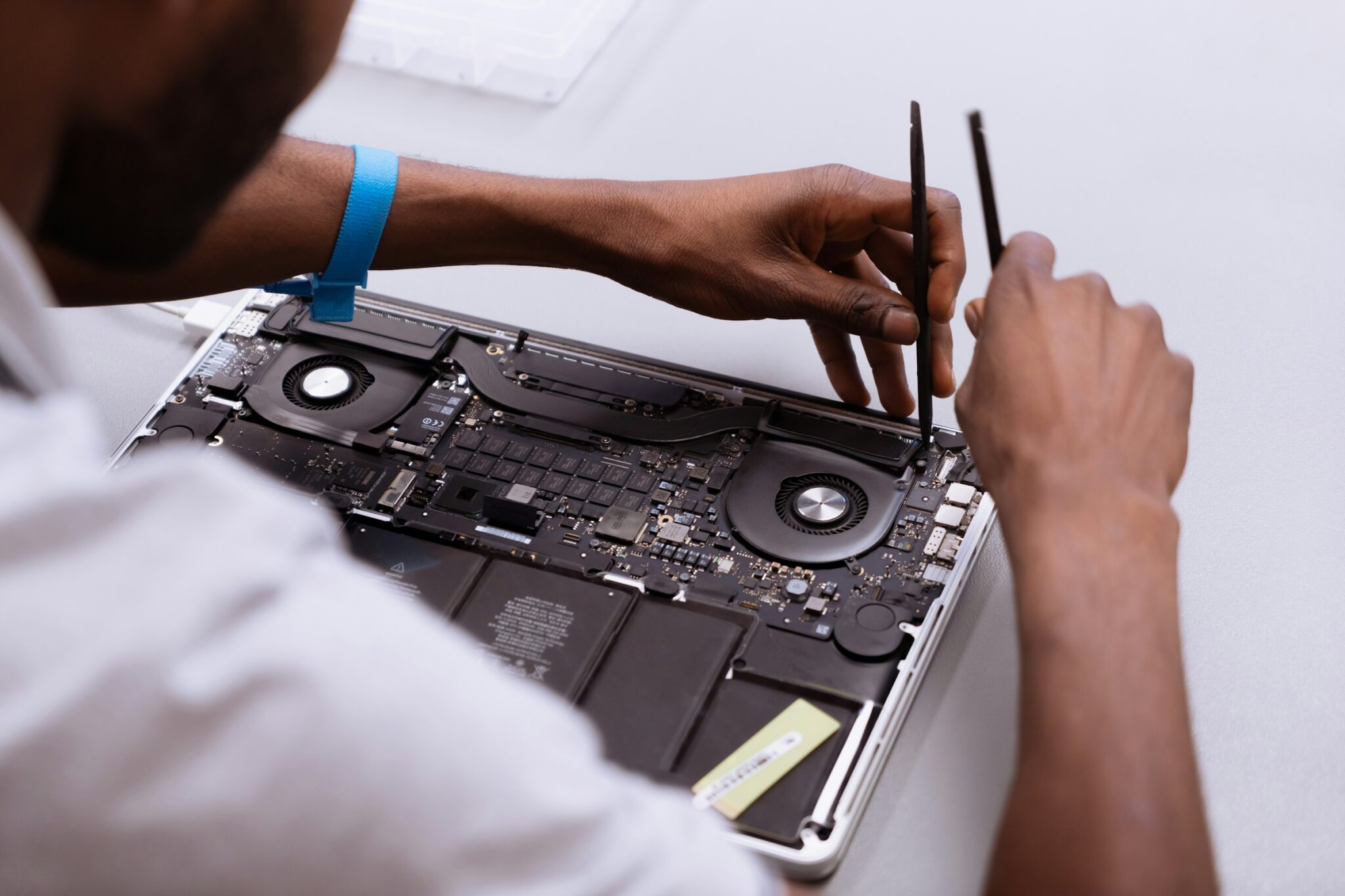
Internal cleanliness is another overlooked factor. Over two or three years, the cooling fans act like small vacuum cleaners, pulling dust into the chassis. This dust coats the heat sinks and fans, reducing their ability to dissipate heat. I recommend a professional internal cleaning or carefully using compressed air once every year to prevent thermal throttling. If the machine can’t breathe, the heat will eventually bake the logic board, leading to permanent hardware degradation.
Finally, let’s talk about SSD health. Modern MacBooks have non-upgradeable storage soldered to the logic board. Every time your Mac runs out of RAM, it uses the SSD as "swap memory." Excessive writing to the SSD can eventually wear it out. To extend MacBook Pro longevity, I suggest keeping at least 15% to 20% of your storage space free. This allows the SSD controller to perform wear leveling more effectively, spreading out the data writes and preventing any single part of the drive from failing early.
| Maintenance Task | Frequency | Purpose |
|---|---|---|
| Battery 20-80 Management | Daily | Reduce chemical stress on lithium-ion cells |
| Software Patch Updates | Weekly | Fix security vulnerabilities and bugs |
| Exterior Cleaning | Monthly | Prevent oil buildup on keys and screen |
| Internal Dust Removal | Annually | Maintain thermal efficiency and prevent throttling |
| Storage Audit | Quarterly | Maintain 20% SSD headroom for wear leveling |
Known Failure Points to Avoid
Not all MacBook Pros are created equal. If you are browsing the refurbished market, there are specific eras you should treat with caution. The most notorious is the Butterfly Keyboard era (2015–2019). These keyboards were prone to failure from a single speck of dust, and while Apple had a replacement program, those programs have largely expired.
Another issue to watch for is "Flexgate," which affected models around 2016-2018. The thin display cables would wear down from the repeated opening and closing of the lid, eventually causing the backlight to fail or show a "stage light" effect. When calculating the average lifespan of MacBook Pro in 2026, these specific hardware flaws significantly bring down the numbers for the Intel era.
Optimizing older MacBook Pro performance after software updates stop is possible through third-party tools, but you must weigh the cost of repairs. If an 8-year-old machine needs a $500 screen or logic board repair, that money is almost always better spent toward a newer Apple Silicon model. For power users, the point where the hardware fails to keep up with modern creative workflows is usually the signal to trade in.
FAQ
How many years should a MacBook Pro last?
A MacBook Pro typically has an average functional lifespan of seven to ten years, which is notably higher than the three to five-year average for most Windows-based laptops. However, for professionals doing heavy video editing or 3D rendering, the practical lifespan is closer to five years before hardware limitations slow down productivity.
Can a MacBook Pro last 10 years?
Yes, it is possible for a MacBook Pro to last 10 years, especially for light users who focus on web browsing, emails, and document editing. While the machine will likely stop receiving macOS updates around year seven, it can still function safely for several more years with careful maintenance and basic software use.
How long does the battery last on a MacBook Pro before it needs replacing?
Most MacBook Pro batteries are designed to last for 1,000 full charge cycles. For the average user, this benchmark is typically reached after about five years of regular use. After this point, you will likely notice a significant decrease in "unplugged" runtime, and macOS may show a Service Recommended warning.
How many years of macOS updates does a MacBook Pro receive?
Apple generally provides macOS software updates for approximately seven years after a model's release. Beyond the major OS updates, Apple often continues to provide critical security patches for an additional two years, giving the device a total of about nine years of protected software life.
What are the signs that my MacBook Pro needs to be replaced?
Common signs include significant thermal throttling (the laptop getting very hot and slow), an inability to install the latest security updates, a battery that lasts less than two hours, or persistent "out of memory" errors during standard tasks. If the cost of a single repair exceeds 50% of the cost of a new machine, it is time to upgrade.
Is it worth repairing an 8 year old MacBook Pro?
Generally, no. An 8-year-old MacBook Pro is likely at the end of its macOS software update cycle and is moving into vintage status. Investing in expensive repairs like a logic board or screen replacement for such an old machine rarely makes sense when that money could be used toward an Apple Silicon model that offers 5x the performance.
Final Verdict: Is 10 Years Possible?
So, can a MacBook Pro really last a decade? The answer is a qualified yes. If you are a student or a home user primarily using a browser and office apps, a well-maintained 2016 model can still feel snappy enough for daily tasks in 2026. However, you must accept that you are operating outside the safety net of the latest macOS features.
For professionals, the conversation is different. The sweet spot for a MacBook Pro lifespan in a high-stakes environment is five to seven years. Beyond that, the time lost to slower render speeds and software incompatibility starts to cost more than the price of a new machine.
To maximize your investment, I recommend prioritizing the MacBook Pro maintenance guide steps: watch your battery cycles, keep the internals clean, and never fill your SSD to the brink. If you do that, the hardware will likely remain standing long after the software has moved on. For anyone buying in 2026, stick with Apple Silicon to ensure the longest possible road ahead.