Quick Facts
- E-Waste Impact: Small IT and telecommunication equipment, including streaming sticks, contributed approximately 5 million tonnes to the global electronic waste stream in 2022.
- Global Reach: As of late 2024, Amazon has sold over 250 million Fire TV devices globally, leading to a massive secondary market for older hardware.
- Top Technical Reuse: Transform your device into a Wi-Fi signal tester using the hidden Developer Tools Menu to map household dead zones.
- Travel Essential: Repurposing an old Fire Stick as a dedicated travel companion allows you to bypass clunky hotel TV interfaces and keep your personal logins secure.
- Business Value: Convert any HDMI monitor into a budget-friendly digital signage player for menus or promotions using CMS platforms like CastHub.
- Trade-In Incentive: If the hardware is too old, the Amazon Trade-In Program offers a 20% discount on new devices plus a gift card for the old unit.
Repurposing an old Fire Stick can extend its lifecycle and reduce e-waste. Practical uses include keeping it as a dedicated travel device for hotel TVs, setting it up in a guest room for streaming, or turning an old display into a karaoke machine using apps from the Amazon Appstore. You can also connect it to a projector for outdoor movie nights or use it as a budget-friendly smart home dashboard.
0. Compatibility Check: Is Your Device Worth Reusing?
Before you dive into a DIY project, we need to talk about hardware limitations. Not every repurposed Amazon Fire Stick is created equal. If you are holding a 1st Generation Fire TV Stick (the one without the Alexa Voice Remote), you might find it struggles with modern apps. These older models often lack the processing power required for a smooth UI experience, and many newer apps require a higher version of Fire OS than these legacy sticks can provide.
However, if you have a 2nd Generation stick or any of the 4K models, you have a powerhouse of potential. To ensure the best experience, your first step should always be a clean slate. Learning how to speed up old Fire Stick for secondary use starts with a factory reset. This clears out cached data from years of streaming and removes heavy apps that might be taxing the CPU. By resetting the device, you give the limited RAM a fighting chance to handle its new specialized role.
| Feature | 1st Gen (Legacy) | 2nd Gen & Above | 4K / 4K Max |
|---|---|---|---|
| Max Resolution | 1080p | 1080p | 2160p (4K) |
| Micro-USB | Yes | Yes | Yes (Mostly) |
| Best Reuse | Basic Signage | Travel / Guest Room | Smart Home Dashboard |
| Performance | Slow / Laggy | Reliable | Snappy |
1. The Wi-Fi Diagnostic Hub: Map Your Home Dead Zones
One of the most technical and useful creative ways to repurpose old Amazon Fire Stick devices is to turn them into a mobile network auditor. If you have ever experienced buffering in the bedroom but perfect 4K streaming in the living room, your home likely has signal interference or dead zones. Instead of guessing where the signal drops, you can use your old stick to get real-time data.
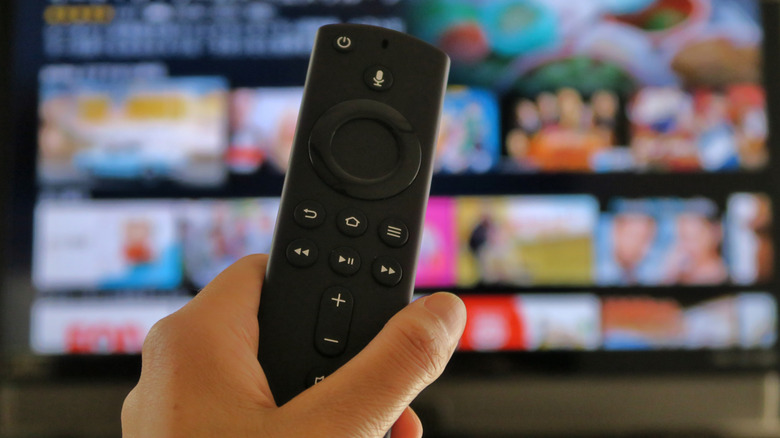
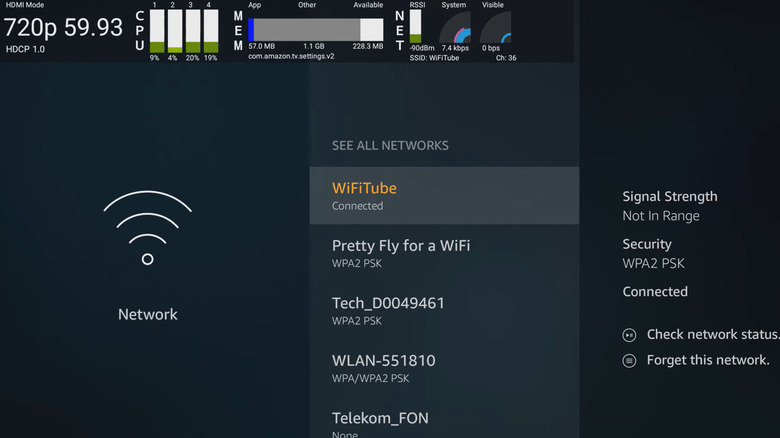
By accessing the Developer Tools Menu, you can see exactly how your router is performing in different rooms. To find this hidden menu, press and hold the Center and Down buttons on your remote simultaneously for five seconds, then press the Menu button (the three horizontal lines). Once inside, enable the System X-Ray feature.
This overlay provides a wealth of information, specifically the Received Signal Strength Indicator (RSSI). Here is how to read the numbers:
- -30 to -50 dBm: Excellent signal; you should have no issues with 4K streaming resolution.
- -60 to -70 dBm: Good to fair; you might see occasional dips in quality.
- -80 dBm or lower: Poor; this is a dead zone where a Wi-Fi extender or a mesh system is likely necessary.
Learning how to check Wi-Fi signal strength with Fire Stick is a game-changer for home automation. Use an HDMI extender to move the stick around behind your TV or even plug it into a spare monitor and walk to different corners of your house to find the best placement for your smart home hubs.
2. The Traveler’s Essential: Consistent Streaming on the Road
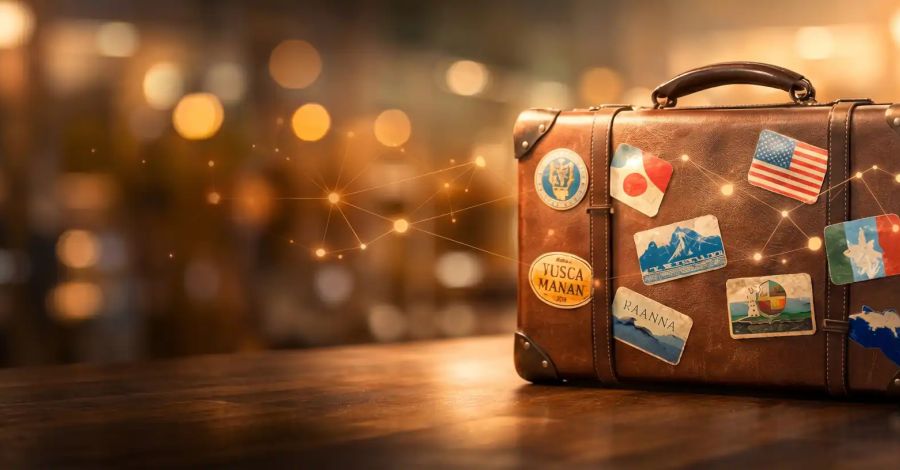
Hotel entertainment systems are notoriously frustrating. Between the limited channel selection and the clunky, slow interfaces of older hospitality TVs, getting to your favorite Netflix show can be a chore. A Fire TV Stick for travel solves this by bringing your entire ecosystem with you.
When you reuse old firestick devices for travel, you ensure that you don't have to log into your private accounts on a public hotel TV. It is much safer and more convenient. However, hotel Wi-Fi often presents a hurdle: the captive portal (the webpage where you enter your room number or last name).
Pro-Tip: When using Fire TV Stick on hotel Wi-Fi tips, keep your remote handy. The Fire Stick is designed to recognize these login pages. When you select the hotel network, it should automatically open a browser window for you to sign in. If it doesn't, try navigating to a simple website like "google.com" in the Silk Browser to trigger the redirect.
Because hotel rooms often have crowded airwaves, using a Bluetooth controllers setup for gaming or navigation can sometimes be laggy. If possible, use the physical remote and plug the stick into the side HDMI port of the hotel TV rather than the back to minimize signal blockage.

3. Budget Digital Signage for Small Businesses
If you run a small business, a cafe, or even a local community center, you know that professional digital signage can be expensive. However, a digital signage Fire Stick setup is an incredibly affordable alternative. While Amazon sells a dedicated Signage Stick for around $100, your old consumer stick can do 90% of the same work for free.
You can transform any HDMI-compatible monitor into a dynamic menu board or a promotional screen. The secret lies in the apps. Platforms like AbleSign or CastHub offer free tiers for small businesses. Once installed from the Amazon Appstore, these apps allow you to upload images and videos from a computer and push them to your screen remotely.
For a simpler setup, you can use the built-in VLC player or a photo gallery app to set up loop video playback. This is perfect for displaying today's specials or operating hours. While these consumer-grade sticks aren't built for 24/7 commercial use, they are perfect for 8 to 10 hours of daily operation, effectively giving you affordable digital signage using Amazon Fire Stick hardware you already owned.
4. Smart Home Dashboard & Dedicated Alexa Hub
One of my favorite ways to integrate older tech into a modern home is by turning old TV into smart home dashboard with Fire Stick. If you have a spare monitor or a small TV in the kitchen or office, you can use the Home Dashboard feature to monitor your entire house.
By holding the Alexa button and saying "Show my dashboard," you can see a bird's-eye view of your connected devices. You can view live feeds from Ring or Blink cameras, toggle smart lights, and check the status of your smart locks. This transforms your old TV into a dedicated home automation command center.
If the screen is too large for your space, you can still use the stick as a "headless" Alexa hub. Plug it into an HDMI-compatible speaker system or an old soundbar. Even without the TV on, you can use the voice remote to ask Alexa for the weather, play music, or set timers. It’s a great way to bring smart functionality to an older audio setup without buying a new Echo Dot.
5. The Guest Room Upgrade: Simplified Entertainment
When guests stay over, the last thing you want is to spend 20 minutes explaining how to use your high-end home theater system or your complex cable box. Using an old Fire Stick in the guest room provides a familiar, user-friendly interface that most people already know how to navigate.
To ensure your guests have a great experience, I recommend creating a "Guest" profile on the device. You can pre-load it with universal apps like YouTube, Pluto TV (for free live channels), and Tubi. This keeps your own watch history separate and ensures they have plenty of content to browse without needing to log into their own accounts.
For a more fun experience, especially if you have kids visiting, turn the guest room TV into a retro gaming station. The Amazon Appstore has a variety of classic games. When you pair a couple of Bluetooth controllers, that old hardware becomes a dedicated entertainment hub that keeps visitors occupied while you finish prep in the kitchen.
When to Let Go: The Amazon Trade-In Strategy
Despite our best efforts at e-waste reduction, there comes a point where a piece of technology is simply too old to be useful. If your stick is a 1st Gen model that crashes constantly even after a factory reset, or if it no longer receives security updates, it might be time to retire it.
However, "retiring" doesn't mean the trash can. The Amazon Trade-In Program is an excellent way to dispose of the hardware responsibly while getting something back. Amazon frequently offers a 20% discount on a new qualifying Amazon device plus a gift card for the appraised value of the returned Fire TV Stick.
This is a win-win: you get the latest 4K Max model with much faster Wi-Fi 6E support and a better processor, and the old hardware is either refurbished or recycled properly. Considering the millions of tonnes of e-waste generated every year, choosing the trade-in route is the most sustainable way to close the loop on your smart home journey.
FAQ
What can I do with an old Fire Stick instead of throwing it away?
You can repurpose it into several useful tools: a dedicated travel device for hotel stays, a Wi-Fi signal strength tester for your home, a budget-friendly digital signage player for a small business, or a smart home dashboard to monitor your security cameras. If the hardware is non-functional, you should use the Amazon Trade-In program to ensure it is recycled correctly.
How do I reset an old Fire Stick to factory settings for reuse?
Go to Settings on your Fire TV home screen, then select My Fire TV. Scroll down to Reset to Factory Defaults and confirm your choice. This process will wipe all your personal data and downloaded apps, making the device feel much faster and ready for a new specialized use case.
Can I use an old Fire Stick as a dedicated travel device?
Absolutely. It is one of the best ways to reuse the hardware. By keeping an old stick in your travel bag, you avoid the security risks of logging into your accounts on a public hotel TV. It also allows you to bypass the limited channel selections found in most hotels and access your personal streaming library.
How do I improve the performance of a slow older Fire Stick?
First, perform a factory reset to clear out old data. Once set up again, avoid installing heavy apps or games. You can also go to Settings > Applications > Manage Installed Applications and clear the cache for individual apps. Additionally, turning off "Off-load Unused Apps" and "Collect App Usage Data" in the privacy settings can free up a small amount of processing power.
Can I trade in an old Fire Stick for a discount on a new model?
Yes, the Amazon Trade-In Program allows you to send in your old Fire TV devices in exchange for an Amazon gift card and a 20% discount toward a new qualifying Amazon device. This is a great way to upgrade to a 4K model while ensuring your old e-waste is handled responsibly.