Quick Facts
- Primary Risk: Acoustic eavesdropping where mouse sensors act as covert microphones.
- Vulnerable Hardware: High-end sensors with 20,000+ DPI and 4,000Hz or higher polling rates.
- Attack Mechanism: The Mic-E-Mouse side-channel exploit that captures micro-vibrations.
- Success Rate: Research shows up to 80% speaker recognition accuracy.
- Core Vulnerability: Exploits the standard USB HID protocol without needing OS-level permissions.
- Top Mitigation: Using thick, vibration-dampening mouse pads to isolate the sensor.
Gaming mouse security is threatened by the Mic-E-Mouse attack, which exploits high-DPI optical sensors as microphones to record desk vibrations. This vulnerability allows hackers to reconstruct speech without specialized permissions, turning a high-performance peripheral into a tool for acoustic surveillance.
As a gaming editor who spends most of my life testing the latest hardware for that microscopic edge in competitive play, I am usually the first person to celebrate the push toward 30,000 DPI and 8,000Hz polling rates. We want the fastest, most precise sensors PixArt can produce. However, a recent breakthrough by researchers at the University of California, Irvine (UCI) has flipped the script. It turns out that the same sensitivity that helps you land a headshot in Counter-Strike is exactly what makes your mouse a perfect candidate for eavesdropping.
The Mic-E-Mouse Attack: How It Works
To understand the core of the Mic-E-Mouse vulnerability, we have to look at what is actually inside your high-end gaming mouse. Most people think of an optical sensor as a simple motion tracker, but it is effectively a tiny, high-speed camera. These sensors, like the ones found in flagship models, take thousands of snapshots per second of the surface beneath them to calculate movement.
The attack treats the optical sensor as a low-resolution camera, typically capturing images at 16x16 or 32x32 pixels. While that sounds too low for any meaningful visual data, it is more than enough to detect micro-vibrations. When you speak, your voice creates sound waves that cause your desk to vibrate at a microscopic level. These vibrations are picked up by the high-DPI sensor as subtle shifts in the surface texture it is "watching."
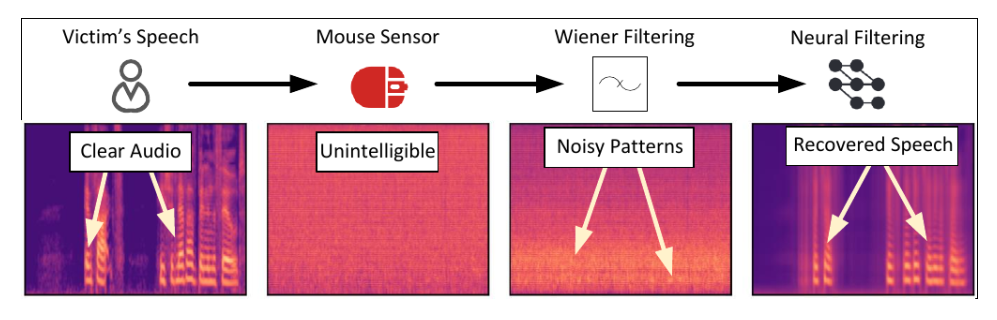
This is where the signal processing comes into play. By analyzing the raw data stream from the mouse, attackers can use neural networks to filter out the noise and reconstruct the original audio. To successfully capture the human voice, which typically ranges up to 2,000 Hz, the attacker needs to satisfy the Nyquist-Shannon sampling theorem. This requires a polling rate of at least 4,000 Hz—a spec that was rare five years ago but is now common in the best gaming mice on the market.
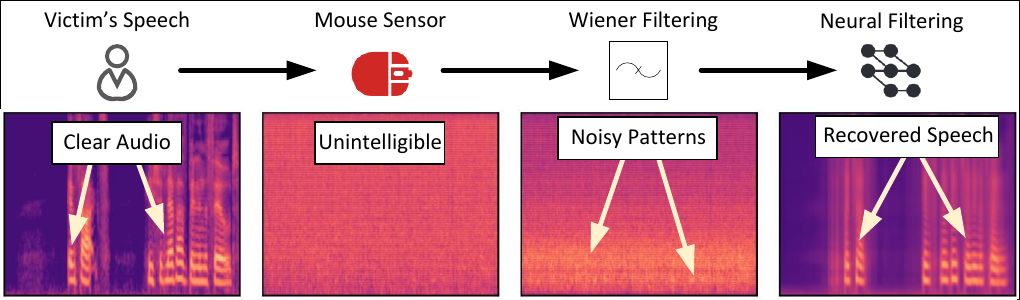
The researchers found that their signal processing techniques could improve the signal-to-noise ratio of reconstructed audio by up to 19 dB. This resulted in a recorded Word Error Rate of 16.79% in human studies, meaning that more than 80% of the words were identifiable to listeners.
Vulnerability Checklist: Is Your Gaming Gear at Risk?
Not every mouse is a potential spy tool. The standard office mouse you found in a bargain bin usually polls at 125 Hz and has a DPI cap of around 1,000. These devices simply aren't fast or sensitive enough to resolve the micro-vibrations of speech. The danger zone starts when we enter the world of enthusiast gaming hardware.
The Mic-E-Mouse attack thrives in the DPI sweet spot of 10,000 to 20,000+ DPI. Higher sensitivity means the sensor is capable of detecting much smaller movements. When you combine this with a high polling rate (4,000 Hz to 8,000 Hz), the mouse provides enough data points per second to rebuild a high-fidelity audio wave.
Vulnerable vs. Safe Sensor Specifications
| Feature | Low Risk (Office/Entry Gaming) | High Risk (Pro Gaming/Enthusiast) |
|---|---|---|
| DPI Resolution | 400 - 3,200 DPI | 10,000 - 30,000+ DPI |
| Polling Rate | 125 Hz - 1,000 Hz | 4,000 Hz - 8,000 Hz |
| Common Sensors | Budget OEM Sensors | PixArt PAW3395, PAW3399, Focus+ |
| Typical Surface | Standard Mousepad | Rigid Desk or Hard Pad |
If you are wondering how to tell if my mouse sensor is vulnerable to eavesdropping, you should look for the sensor model in your mouse's marketing materials. The PixArt PAW3395 is one of the most popular sensors in the current wave of "superlight" Chinese gaming mice and enthusiast brands. Because this sensor is now available in mice costing as little as $40, the attack surface has expanded far beyond just the wealthy elite of the gaming world.

In experimental evaluations, the researchers proved the effectiveness of these specs. The Mic-E-Mouse attack pipeline achieved speech recognition accuracy ranging from 42% to 61% and reached a speaker recognition accuracy of 80%.
Why Your Antivirus Can't Stop It
The most unsettling part of high-DPI sensor privacy risks is that the attack requires zero-privilege access. In most operating systems, mouse movement data is considered "low-risk." Unlike your webcam or microphone, which trigger a little green light or a privacy prompt in Windows or macOS, your mouse is constantly sending data that any application can listen to.
This data travels via the USB HID protocol. Because your computer needs to know where the cursor is at all times, the system doesn't restrict which apps can see those coordinates. A malicious script hidden in a website (via WebHID) or a piece of legitimate-looking game telemetry software could theoretically record the mouse's "jitter" without ever asking for permission.
Traditional antivirus software fails to detect Mic-E-Mouse because it exploits the fundamental hardware-level USB HID protocol rather than a software bug or a virus. It looks like normal mouse movement to the OS. The researchers involved in the study notified 26 different manufacturers about these optical mouse security vulnerabilities, but since the issue is rooted in the physical sensitivity of the hardware, it is not something a simple software patch can fully "fix" without degrading performance.

How to Prevent Mouse Sensor Eavesdropping
If you are using a top-tier gaming mouse for work or live in an environment where confidential conversations are the norm, you don't necessarily have to throw your gear away. You can balance high-performance gaming with preventing peripheral eavesdropping by using a combination of physical and digital strategies.
Physical Mitigations
The easiest way to stop the Mic-E-Mouse attack is to kill the vibrations before they reach the sensor. The attack relies on the desk acting as a resonance chamber.
- Use thick mouse pads: One of the best thick mouse pads for vibration dampening is a 5mm or 6mm "heavy" cloth pad. Soft foam bases absorb the micro-vibrations from your voice, making it impossible for the sensor to pick up a clean signal.
- Surface choice: Avoid hard plastic or glass mouse pads if you are concerned about privacy. These rigid surfaces are excellent for transmitting acoustic waves directly into the sensor.
- Desk Isolation: If possible, place your PC or other vibrating equipment (like speakers) on a separate surface or use isolation feet.
Digital Mitigations
For those who want a more technical approach to how to prevent mouse sensor eavesdropping, you can limit the data the sensor provides.
- Lower the Polling Rate: Unless you are in a high-stakes match, cap your polling rate at 500 Hz or 1,000 Hz in your mouse software. This prevents the high-frequency sampling necessary for audio reconstruction.
- Manage DPI: Lowering your hardware-level DPI can also reduce the sensitivity to micro-vibrations.
- Linux udev rules: Advanced users can implement blocking vulnerable USB HID devices via udev rules. By setting rules that restrict high-frequency HID reports from specific device IDs when the screen is locked or during specific hours, you can create a software-level firewall for your peripherals.
User Security Audit Checklist
- [ ] Check if your mouse sensor is a PAW3395, PAW3399, or similar high-DPI model.
- [ ] Verify if your mouse supports polling rates of 4,000 Hz or 8,000 Hz.
- [ ] Switch from a thin or hard pad to a thick (5mm+) cloth mouse pad.
- [ ] Set your "desktop" profile to 1,000 Hz polling rate and your "gaming" profile to high speed only when needed.
- [ ] Be mindful of keeping your mouse on the desk during private or confidential meetings.
FAQ
Can a computer mouse be used to hack a PC?
While a standard mouse is usually safe, high-performance gaming mice can be exploited for acoustic surveillance via the Mic-E-Mouse attack. In different contexts, "bad USB" devices disguised as mice can also inject malicious keystrokes to take control of a computer. However, the specific sensor-based risk discussed here is focused on eavesdropping rather than direct system control.
Can a gaming mouse record or monitor keystrokes?
Not directly through the optical sensor, as the sensor is pointed at the desk. However, the same acoustic surveillance techniques used in the Mic-E-Mouse research could theoretically be used to identify the unique vibration patterns of different keys being pressed on the same desk. This is another form of a side-channel attack that relies on high-DPI sensitivity and signal processing to reconstruct what a user is typing.
Are there security risks associated with RGB lighting software?
Yes, but they are different from the sensor risks. Many RGB control applications require high-level system permissions and have been found to have security vulnerabilities in the past. Because these apps often act as drivers, a flaw in the software can give an attacker deep access to your system. It is always safer to use open-source alternatives like OpenRGB or the mouse’s onboard memory to save settings and then uninstall the software.
Is it safe to install gaming mouse software?
Generally, software from major brands like Logitech, Razer, or SteelSeries is safe, but it often includes telemetry that tracks your usage. The bigger security concern is the "zero-privilege" nature of mouse data; an attacker doesn't need you to install specific mouse software to exploit the sensor. They only need a way to read the standard HID data stream that the mouse is already sending to the operating system.